Building Websites for AI: Why Accessibility, Structure and Clarity Matter
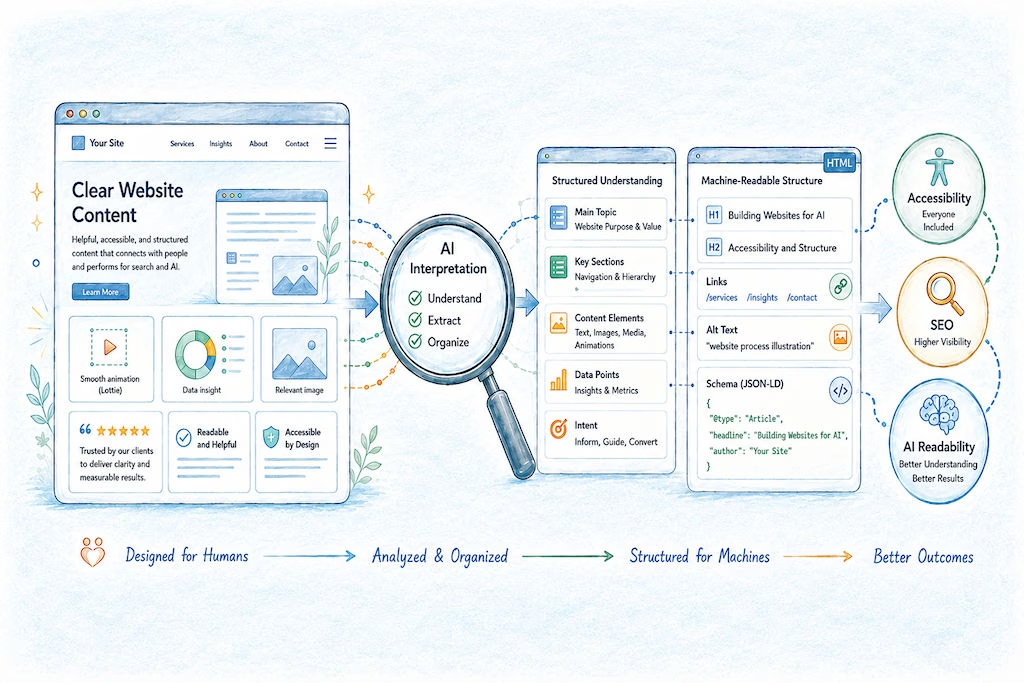

Building Websites for AI: Why Accessibility, Structure and Clarity Matter
As AI becomes another front door for discovering information, a fairly predictable question is starting to crop up in marketing meetings:
“Do we need to redesign our website so AI can understand it?”
The reassuring answer is: probably not.
You certainly don’t need to rip everything up and rebuild your website around the latest three-letter acronym being sold as the future of search.
In fact, much of what makes a website easier for AI systems to understand is already familiar territory: good accessibility, sound technical SEO, semantic HTML and clear content structure.
There is, however, one important misconception worth clearing up first.
1. Can AI Actually “Read” Your Website?
The confusion usually starts with a demo.
Someone uploads a complicated chart, a screenshot of some software or a photograph of a whiteboard into ChatGPT or Claude. The AI interprets it, summarises it and explains what is going on remarkably well.
The obvious conclusion is:
“If AI can understand that image, surely it can understand all the graphics, icons and animations on our website?”
Hm, not necessarily.
There is an important difference between what an AI model can understand when you deliberately give it something to analyse and how search, crawling and retrieval systems discover information across billions of web pages.
When you upload an image directly to mainstream AI model, that image is explicitly being presented for analysis.
Web discovery is different; depending on the platform, systems may work with combinations of:
- HTML
- Extracted text
- Headings and document structure
- Links
- Metadata
- Structured data
- Rendered page content
- Search indexes
- Cached or previously processed information
Some systems may also use visual or multimodal processing as part of that process. The important point is that we shouldn’t assume every graphic, animation or icon on every page is being interpreted visually in the same way as an image uploaded directly into an AI conversation.
Put simply: Just because AI can understand something doesn’t mean every AI retrieval system is looking at it.
2. AI Capability & AI Web Discovery Are Different
This distinction matters.
AI interpretation:
You give a model an image, screenshot, chart or PDF and explicitly ask it to analyse it.
AI web discovery:
A crawler or retrieval system has to process huge volumes of online information efficiently, work out what matters and make that information available later when somebody asks a relevant question. Those are very different jobs.
An AI model might be perfectly capable of understanding your beautifully animated customer journey. That does not necessarily mean the system discovering your website has analysed that animation frame by frame and understood the story you intended it to tell.
So, a useful rule for web teams is:
Don’t make important business information dependent on a machine successfully interpreting the visual design.
If something matters or it’s worth saying, say it with words!
3. The “As Things Stand Today” caveat
There is an important caveat we should include here, which is that AI technology is moving ridiculously quickly.
Multimodal systems are improving, processing costs will change and search systems are likely to become increasingly capable of understanding complete rendered pages, not just their underlying text and markup.
So this is not an argument that:
“AI can’t understand website visuals.”
It is an argument that:
As things stand today, important commercial information should also exist in explicit, accessible and machine-readable form.
Tomorrow’s crawlers may be considerably better at understanding an infographic, interactive demo or animation.
Fine. But clear HTML underneath it still won’t have done you any harm.
4. Accessibility, SEO and AI-Readability Intersection
This is where things get interesting.
If you want to make a website easier for AI systems to interpret, accessibility is a surprisingly good place to start.
The three disciplines overlap considerably.
Accessibility: Makes information understandable and usable across different devices, abilities and assistive technologies.
SEO: Makes information easier for search engines to discover, crawl, interpret and index.
AI-readability: Makes information easier for retrieval & generative systems to extract, contextualise and reuse accurately.
And many of the things that help one also help the others, such as:
- Sensible heading hierarchies
- Descriptive links
- Semantic HTML
- Logical page structure
- Useful alt text
- Clearly labelled forms and controls
- Accessible navigation
- Text explanations of important visual information
That gives us a useful principle:
A page that explains itself clearly to a screen reader will often also explain itself more clearly to a machine.
Not because AI engines follow accessibility standards in exactly the same way, but because both benefit when meaning is explicit rather than implied.
5. What Makes Pages Easier for Machines to Understand?
There isn’t a secret “AI HTML” specification, a lot of it is simply disciplined web publishing.
Use a clear H1
The main heading should make the subject of the page blindingly obvious.
Build a logical H2/H3 hierarchy
Headings should describe the structure of the information, rather than being chosen because someone likes the font size.
Use descriptive page titles
“Services” tells a machine (or a human) very little.
“Commercial HVAC Maintenance and Repair Services” tells both groups considerably more.
Write meaningful links
“Click here” and “Read more” throw away useful context.
“Explore our kitchen management systems” tells the reader what lies at the other end of the link. Yes, this can make button design, especially for mobile devices… challenging.
Use proper lists and tables
If something is a list, mark it up as a list.
If you’re comparing genuine tabular information, use a table rather than creating something that merely looks like one.
Use semantic HTML
Use meaningful structural elements such as "main", "navigation", "articles" and "sections", alongside proper headings and correctly marked-up controls, to help describe how a page is organised.